
1. Login to Guided Home
2. Navigate to the Site > Plot you want to update
3. Click on the Plot settings icon in the top right hand corner (the Cog icon)
4. From the popup you can edit the following fields for:
- Apartments: Unit Name and Unit Number
- House: Plot Name and Unit Number
NB: These fields along with the Postal Address are shown on the homeowner view.
To Update the Postal Address - for a HOUSE - go to the Address tab and click on the Edit button:
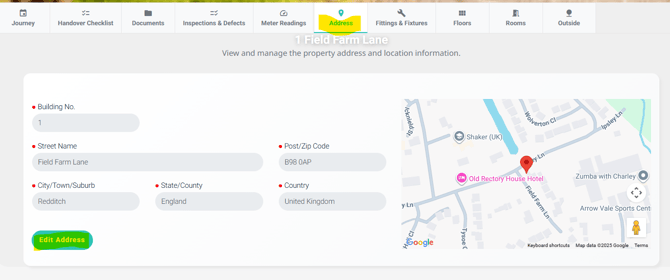
To Update the Postal Address - for a APARTMENT
1. Navigate to the Unit. Under the Unit address you'll see grey text (highlighted in yellow below), with the Apartment Building name. Click on this link
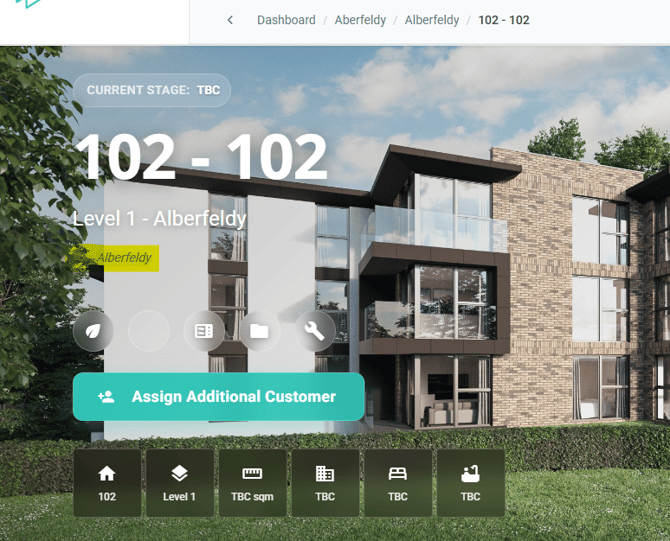
2. Next, go to the Address tab and Edit the address for the Building. This apartment building address will be used for all units. Combined with the individual Unit Name and Unit Number you can create the correct postal address
Note:
When you give a customer access to their plot via the Assign Customer wizard you will be shown the address and can edit this prior to handover.